Category: Activity
Game: Creative Definitions
If you listen to NPR’s “Wait Wait…Don’t Tell Me!,” you’ll know about the various games that are played [Credit to Jim and Susie for getting me started listening to this show]. Many of these could be adapted as YCISL creativity activities.
Here is an example of one game from the show [from Wikipedia entry]:
Bluff the Listener
The contestant hears three odd but related news stories read by the panelists. Two of the stories are invented by two panelists, with the actual story being read by the remaining panelist. The listener must determine which one is true and not a product of the panelists’ imaginations. The show uses a sound bite from the actual story (either the newsmaker himself or herself, or a reporter or expert familiar with the story) to reveal the answer.
Perhaps we could conduct this game using sustainability-related news?
Another example, we could get groups of three or more students to come up with definitions for unusual words (English, I would presume – I hope this works) and they would present their definitions – and the actual definition – and an example of its use in a sentence. The other participants would vote on which definition they think is correct.
A 3rd example is to have participants create fake announcements for school or their family or friends (eg, parents caught speeding at school drop-off will get citations and fines from the school). Other participants will try to identify the true announcement.
Or students could create their own games using a similar style. Using sustainability as a theme, perhaps we could use the Fill in the Blank game?

WSJ: Children Learn a New Way to Play At Summer Camp That Teaches Tech
In the Thursday July 5, 2012 issue of the Bay Area edition of the WSJ on page A7B, there is an article titled “Children Learn a New Way to Play At Summer Camp That Teaches Tech” by Rachael King which describes the ID (“Internal Drive”) Tech Camps – some of which take place at Stanford. Many private non-Stanford companies run summer camps at Stanford as well as other university campuses.
One of my children attended a similar camp at Stanford in summer 2011 offered by Digital Media Academy – it was a compelling package including a Java curriculum based on Stanford’s popular CS106A course (including Karel the Robot) and overnight accommodations in a Stanford Row House. However, the only really authentic Stanford quality of these camps is the Row House living, dining in one of the Residence Dining Halls and being on-campus. Stanford classrooms are not used (our camp had a computer lab set up in the Row House’s kitchen), the people are migratory (just here for the summer), and the Stanford scholarly culture and atmosphere are missing.
I also say this to differentiate the YCISL program from these summer camps. The summer camps are a marvelous asset to extending learning opportunities when school is closed for the summer; this helps address the deep lull some students may get into when they are not tasked with school work (an interesting puzzle that there is way too much work during the school year, and relatively little during summer). So, I view the 3rd-party summer camps such as those at Stanford as competitors and I need to emphasize the YCISL features that works to our participants’ advantage. I also recognize that Stanford Summer College and EPGY are also competitors, and communicating the differences is warranted.
As for the WSJ article, I wish it had provided more evaluation on how camps such ID Tech helps supports education.
Thoughts: Creativity from Any Point of View
In a Nikon ad that came with today’s paper, there is a statement saying “CREATIVITY from any point of view” which reminds me of how creativity is a vital component of the photo essay that the YCISL students have to compose. As an example, photographs of the same object or scene from different angles or distances can inspire different thoughts and interpretations. By being creative in how the photograph is presented in the photo essay, the viewer’s response can be lightly or heavily influenced. Quite powerful.

Exercise: Empathy and User Experience Through the iPad
 Here are my notes for an exercise that utilizes the iPad to create a user experience-focused mini-project that combines technical (functional requirements) and emotional (user needs and preferences) design.
CSDGC
YOUTH CREATIVITY, INNOVATION & SUSTAINABLE LEADERSHIP PROGRAM
iPAD USABILITY EXERCISE
June 2, 2012
CONCEPT
Experience the interface between a developer/producer and an end-user by applying consult-design-build an iPad layout with a goal of customized usability.
FRAMEWORK
The iPad is the latest popular mobile information appliance, and is on the leading edge of human-computer interaction with largely untapped potential for usability. Students will examine various parameters of usability, develop a concept and attempt to gain user satisfaction.
THE ASSIGNMENT
Each team of students will consult with an iPad user to gather user preferences, habits and needs, then redesign the content and layout of the iPad screens – at first, on paper and getting the user buy-in; and second, implementing the design and getting customer feedback.
RULES
Each team will designate just one member to interview the client user. An interview may last up to 10 minutes.
Each team may designate up to two members to conduct an observational study. An observational study may last up to 15 minutes.
Each team must apply at least one IDEO Method Card in the data gathering part of their effort.
Up to $20 of paid apps may be purchased from the App Store. Paid apps already on the iPad do not count towards this limit. There is no limit of FREE apps from the App Store that may be installed.
Teams may provide their user with a one sheet Quick Guide to explain the new layout (this may be handy ahead of one of the challenges).
THE CHALLENGE
The team mentor will select one or more particular uses for the user to attempt using the new layout. This challenge will be scored by a combination of time in seconds to complete the task and the number of interactive motions (eg, taps, swipes, button pushes, etc). Mistaken moves will also count.
Additional notes (from my notepad):
IDEO Method Card scenarios to recommend – Flow Analysis, Personal Inventory, Cognitive Map, Narration, Fly on the Wall
The How? Understand customer habits and needs -> interview or prepare questionnaire.
Study current layout->discover likes/dislikes
Brainstorm possible improvement strategies-> Plan
Create new feature list
Uncover new uses
Increase efficiency
Address concerns
Documentation->rate satisfaction from user and developer perspectives
Implement changes->get feedback on tangibles and intangibles
Exercise: Sailcar
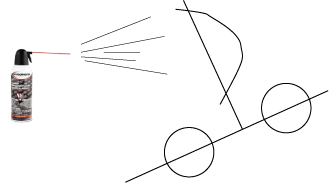
Here are my notes for a sailcar rapid prototyping exercise. It is intended to teach working on a primitive prototype of a product idea.
CSDGC
YOUTH CREATIVITY, INNOVATION & SUSTAINABLE LEADERSHIP PROGRAM
PAPER SAILCAR EXERCISE
June 4, 2012
CONCEPT
Rapid design, build and prototyping of a wheeled vehicle (out of limited materials) that is propelled by a can of compressed air.
FRAMEWORK
Working with simple materials to build a prototype is a technique employed in many product development cycles. This exercise focuses on the simple form and function of a wheeled vehicle, and provides only a can of compressed air to create movement.
THE ASSIGNMENT
Build a set of functional requirements such as number of wheels, sails, size, etc. Then render a drawn design of the proposed vehicle. Next, build the vehicle and engineer as needed within the time limit. Each team will then put their vehicle through some tests.
RULES
Materials include 3 sheets of 8.5”x11.5” cardstock, three straws, a pair of scissors and a roll of Scotch tape. Each team will also receive only one can of Duster compressed air.
Teams will have 15 minutes to work on the functional requirements and drawn design.
Teams will have 30 minutes to build and engineer their vehicle prototype.
THE CHALLENGE
Speed: To cross a finish line in the shortest time.
Distance: To cover the most longitudinal distance with x seconds of compressed air.
Maneuver: Steer the vehicle around obstacles without falling over.
VARIATIONS
Provide a balloon for propulsion (speed or distance challenge).
Design a watercraft.
Vehicle must carry golf ball.
WSJ: Interior Gardens Hit the Wall but Don’t Forget to Water Them

This article (WSJ May 30, 2012, Personal section) reminded me of Rik Juan Yikai’s design of a green office divider. I am going to order a few of the Wally Ones by the Woolly Pocket Garden Company: one to try out in my office, and the others to inspire similar thinking in a YCISL exercise, perhaps rapid visualization and prototyping. We can look at the feature set as well as the challenges that must have been faced in the design. Will we be able to detect any issues that were not addressed? The blend of garden greenery, home decor, architectural feature (uses wall space which is often ample in a home) and recycled material serves as a good case study for the YCISL.
Exercise: Uses for a Pail (Multitasking Revisited)
In extension to the entry titled “Unitaskers Bad, Multitaskers Good,” I am thinking that a bucket/pail might be a great object to ponder multitasking. I have several around the house and in the garden.
One approach would be to actually bring one or more pails in. We could do the brainstorming exercise (a) with no visual identification of the object (i.e., just tell them it’s a pail), (b) with an image on a screen or piece of paper (i.e., no 3-d impression), (c) with a pail sitting at the front of the room (i.e., observe from a distance, or (d) actually have participants play with one first or during.
I am also thinking to make this an experiment where we also develop a methodology and collect data for analysis.
We would give the same exercise to individuals not in the workshop to create a reference set of ideas for usage. The reference set would be longitudinal in age, and these references would be used to compare with the results from workshop participants.

Exercise: School Rules
Briefly, the idea is a PostIt type exercise where participants brainstorm changes to the rules at school. Simple targets may be the timetable (including start and end times, lunch breaks, etc) and dress code. How about rearranging the seating style in a classroom (oftentimes in rows)? I am sure we could also examine one or two sets of school guidelines to come up with more. This exercise hopefully mixes feasibility with fantasy, and reality with possibility.

Design Challenge: Paper Planes

In today’s WSJ (Thursday May 17, 2012), there is an article titled “Paper Plane Champ Watches His Record Fly, Fly Away” about a controversy in the competitive paper plane world. This reminded me of a time someone suggested that a paper plane exercise could serve as a basis for a YCISL exercise.
The article mentions an iPad app – which I have downloaded. The base version of the app shows how to fold three types of paper planes: Stunt (flips), Dart (distance), Eagle (hang time).
This also reminds me of a scene where kids throw paper planes off a building where the paper has something written in it.
I am thinking that we would use such an exercise for younger students, or perhaps a preview event. Three attempts? Three paper planes? Team or individual?
Could we use recycled material for this exercise? Would newspaper work? Could we use aluminum foil that has been used previously in the chute exercise?
Perhaps as a parallel type exercise, students could design a trebuchet or crossbow or a stomp rocket or a finger blaster or a mentor rocket (reminder, use eye protection).
Could this be set up as a fundraising competition (like a walkathon) where a person is sponsored by the number of paper airplanes made or the time a plane hangs in the air or the distance it flies?
Article link: http://online.wsj.com/article/SB10001424052702303879604577408194095860860.html