Category: Ideas
Idea: Can OOBE design count as a skill?
Opinions about anything (people, places and products in the broadest sense) are formed quickly and the most influence on that opinion occurs on the order of seconds to minutes. It’s part of our rapid filtering process because there are so many things being sensed. And that initial opinion (bias) can never be completely erased. One of the things that goes on during product development is OOBE (out-of-box experience) design which is intended to craft the customer/user experience from the initial contact with the product until it is in basic operation mode. Apple is the best known in OOBE design especially from package opening to activation. Perhaps one of the most famous OOBE features is in the original Macintosh computer with its power-on sound. It gently provided the user assurance that the system was receiving power (the unplugged cable was a huge technical support issue back then) and that the user-friendly experience was about to begin (too bad for the Sad Macs). I learned about and worked on OOBE for a little while at Handspring. Before that, I had to be familiar with BOMs and the marketing requirements that went along with it. A Product Marketing Manager with an MBA qualification was the OOBE Lead but really it required a scientific approach to determine and achieve optimum OOBE. Careful research is required. We were focused on both external and internal factors but usually ended up being most selective with just a top few factors of what we thought would be the most influential. Funny story: I remember when a sticker would get attached to the product when a serious OOBE flaw was discovered after production. OOBE is more so important in product innovation because users will generally be having a first-time experience with the truly innovative feature and OOBE frustration could quickly become negative opinion. So in YCISL, where we take a guerrilla approach to innovation, OOBE design is a skill that should be coached to youth in order to optimize the minimum cost-maximum impact as well as competitive advantage. And since YCISL is a small group, we may be able to collectively analyze OOBE and practice it as a skill relevant to creativity, innovation and leadership. Even moreover, it would seem that excellent OOBE design could change the perception of sustainability as sacrificial as opposed to sensible organic growth.
Basic Introduction to OOBE (practice for YCISL activity mentors):
1. Choose a product.
2. Simulate user experience, taking photos at every step.
3. Evaluate each step with respect to visual, tactile and interaction experience. Also evaluate waste impression.
Outline of OOBE Evaluation Activity for YCISL:
1. Choose a product. Product should include packaging and collateral as well as the product itself.
2. Simulate user experience for 5 to 15 minutes (longer may be needed for multi-step set-up).
3. Evaluate visual, tactile and interaction experience and impressions of all materials. Were any sustainability features part of the OOBE experience?
4. Rate the overall OOBE experience including non-critical materials.
5. Repeat with a competing product. Compare.
Outline of OOBE Design Activity for YCISL:
1. Choose a product. Remove packaging and collateral, keeping only the main product and any required accessories.
2. Examine the product’s form and function.
3. Design packaging and collateral for the product. Add a sustainability highlight to the OOBE, if possible.
4. Evaluate the features of the OOBE design.
5. Have someone else evaluate and provide feedback on your OOBE design.
Training: Problem-Solution Attributes
From this summer’s youth workshops, I learned to appreciate more the connection between problems and their solutions. Specifically, I learned to appreciate “attributes”, a term used by one of our docents at the Cantor Arts Center when she was asking students to look for visual clues in artwork.
A new skill that we will incorporate into our 2015 workshops is problem definition and problem statement development (it is a project rate-limiting step that takes a while to activate). For our training approach, we will use a reverse (people usually think of a problem first then the solution) thinking method where we choose a solution (they’re all around) then work out the problem they were intended to solve.
1. Look around you and pick an object to observe closely.*
2. What are its attributes? Think of both its forms and functions. Think of how you interact with it.
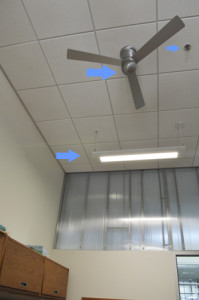
3. Describe the problem that this solution addresses. Remember that this is a trained skill so initially the thoughts may be slow to form, but we still want to use our creative thinking so do this step fast – within 30-60 seconds.
Repeat these steps as part of your training. Increase the detail of your problem description gradually – without becoming complex. You can develop scoping as well as depth skills. Apply your EQ as well so that others can empathize with the problem.
Bottom line: Practice this regularly. It should take no more than 3 minutes each time. Eventually you will understand how to form an effective problem statement by observing a problem that needs to be solved.
*Need a hint to get started? Pick something on you or in your pockets. Or look in your bag/briefcase. For something more challenging, choose something that you probably see often in passing but don’t really think much about it.
ACTIVITY: Filtering at the Early Prototyping Stage
Prototyping is the second stage of the YCISL simple innovation framework. In this stage, you select some of the best candidates from the brainstorming stage and try to construct simple models or simulations of the select ideas in order to quickly identify weaknesses, challenges and problems associated with each of the prototyping candidates. This is in line with the “Fail early, fail fast” mindset we apply in our workshops. The aim is to advance just one of the prototyping candidates to the engineering level.
However, this is also a good time to document the main advantages of each of the prototyping candidates as well. The potential distance and impact of each prototype candidate are valuable considerations and will help maintain a positive mindset as development continues. Therefore, a technique for early prototyping is proposed where the positive aspects (“praises”) and negative aspects (“criticisms”) are extracted and sorted into their respective boxes. For prototyping, we are usually looking for prospective showstoppers, dead-ends and oopsie daisies! These will be dropped into the CRITICISMS box but this box will also contain the lesser risk and lower severity issues – and this whole box should be saved for later in the testing and readiness stages. This late engineering stage will be where the user guide and other “accident avoidance” strategies will be developed to steer the user away from or around known issues – or fixes could be developed if there is an opportunity.
The other aspect of the PRAISES-CRITICISMS filtering is the collection of the positive aspects (“motivators”) which move the work forward. Prioritization is needed for this box but comparative analysis of the PRAISES box for each prototyping candidate will help provide guidance on the risk-benefit and competitive advantage. The PRAISES BOX can be used in the mid-prototyping stage where the team can evaluate how fantastic a feature can be (e.g., battery life which could be good, better and wow!) Remember that the aim of prototyping is to find the most compelling product to solve the problem and invest the most resources in getting the product to be successful and displacing existing alternatives.
In sum, a PRAISES-CRITICISMS filter is recommended in early prototyping to help weight the benefits of advancing prototyping candidates, set the criteria for early failure and build a bank for late engineering testing and readiness.

Exercise: A Training Regimen for Positive Thinking
In YCISL, we view positive thinking as a requirement in creativity, innovation and great leadership. In our workshops, we watch and discuss Shawn Achor’s TED Talk “The happy secret to better work” (introduced to me by mentor Navid). I also present lessons I learned about smiling from Guy Kawasaki’s book “Enchantment” and the WSJ article “Stress-Busting Smiles.”
From the discussion in “Enchantment,” we can learn to detect the authenticity of a smile on others by crow’s feet. Conversely, we can learn to feel our own smile authenticity. A simple exercise to practice oneself is to associate the “scrunching” of the orbicularis oculi muscle with turning on a (highly) positive mindset. Practice this regularly and see if you can condition yourself to activate your own positivity with the act of a real smile. At the start, perhaps you might need a visual or audio aid that will help you get in the positive mindset, but train yourself to eventually get to the positive state with just your thoughts. A variation on this would be to start off by putting yourself in a mindful or meditative state, then go for repetitions (mindful-positive-mindful-positive-etc) and sets just as if you were working out with weights.
The next level up may be to train yourself to find the positive disposition despite a mixed field of positive and negative stimuli – a real world situation where sometimes the negative drown out the positives or the negative sticks better. The aim of this exercise will be to expose oneself to the mixed stimuli array and be able to filter out the negative so that only the positive remain. For example, if you are leading a team, could you look past all the problems and identify things which are working? Here are a few variations on a drill with this aim in mind:
– Pick a restaurant (or some other business) listed on Yelp. Read the reviews with the mindset that you are going to dine at this restaurant. Make only one pass through the reviews. When you are done reading the reviews, can you list 5 positive things about the restaurant? Could you compose a justification for going to this restaurant? Are you able to block out the negative comments?
– Read a newspaper or listen to an evening news broadcast. Can you make a list of the positive news that was covered?
– Observe how a person is dressed and make mental notes. When the person is gone and out of sight, can you list 5 positive thoughts about what you saw? Variations on this could be how a person spoke or how they performed (e.g., music or sports).
– Go to a restaurant (or any store). After you’re done at the restaurant, can you list 5 good things about the experience?
– After a week of school or work, can you list 5 things that went well or made you feel good?
When you feel you have started to master being able to focus on the positive aspects, try extending your lists so that you can exhaustively include all the positives. Vary the time horizons too – the last one in the list is over a time period of one week and the others are over a few minutes to about an hour. Feel free to customize as well to suit what is going on around you or what you regularly encounter. Try doing this in a quiet place to start (e.g. your room) then try to do it in a busy place (e.g., at a sports event). I recommend mostly training yourself in a quiet place. If you want to make it a competitive challenge, do the drill together with another person and see whose positivity is more focused.
I intend to develop a YCISL workshop module that uses the Yelp setting. Yelp is replete with low-value negative compositions – that is the natural bias – and it takes focus and skill to find the positive comments worth remembering and acting upon. Similar situation with the news which generally feeds on a bad news bias. And for both of these, there is no shortage in the supply of material to sort through.
Remember that the aim is to train yourself to strengthen and more quickly activate your positive thinking mindset. Such things take time so don’t rush it. Understand the purpose, direct yourself and sense the mastery developing within you (yes, I’m trying to get you intrinsically motivated!) With a developed positive mindset, we hope that your decision making and strategizing leadership skills will shine. Your innovation process will also make more progress as a successful innovation result comes from doting on the positive attributes, not the negative ones.
Idea: The History of My Life in Photography Terms
Much of my life can be traced along the lines of the history of computers – that is, I can relate many changes in my life in tandem in my use of computers. This is why visiting the Computer History Museum was a lot of fun. Thinking to the start, I won’t include the Casio fx1000 (although that was very cool and a significant aid), I like to think of my TI-55 with its red LED display (how cool was that?) as my first computer – it was programmable!
Back to photography. I like to think of the photographic timeline because of the massive transformation that happened due to digital photography. I remember spending many happy hours in a dark room in high school working with chemicals, photo paper, glove bags, film, tanks, reels, and enlargers. The smell of the chemicals are still vividly in my memory. Then there were the stores or drive-throughs where you dropped off film and picked up a week later (initially) or 1 hour (later). That is mostly in the distant past now, with a trickle of activity at the photo labs of drugstores or Costco.
So what changes best define photography to me? Well, my first recollection is the Kodak Instamatic with its cubic flash attachment. Somewhere in there was the Polaroid although I personally didn’t have one. One of my first serious cameras was the Pentax ME (I think my first hobbyist camera actually wasn’t an SLR). It was good enough for snapshots around school to develop in the dark room. When I graduated from high school, I got myself a Nikon FM and a Nikon EM. Used them on my trips to Sri Lanka and Europe. Then we tried a Canon APS format camera which was used for a relatively short 2 years; it still sits in a drawer but the APS technology didn’t make sense. We went back to regular 35 mm film when my first child was born – an Olympus, I believe. Then we got into digital photography before my second child was born – and the changes were more than I could have ever predicted. We’ve experienced several solid Canon Elph digital cameras, an Olympus which used a flash memory that quickly disappeared, an un-durable Casio Exilim, a hand-me-down Pentax that was tired, a Nikon D50 that drowned in Gatorade and even an Apple QuickTake 150. I’ve also used disposable cameras and even underwater disposables. It’s been fun trying all of them but I’ve learned not to expect too much. I now have a Nikon D40 which has served me well but is now starting to disappoint and a Sony Cybershot (so now I have a lot of fun taking panorama photos). With the D40 I have invested in lenses – finding out my older Nikon lenses were of no use – and lighting equipment including flashes, stands, and a commander. I continue to learn new things – most recently about lighting options for more interesting shadows.
I recognize myself by this history with cameras. They have changed physically and in their emotional effect. They have impacted my routines (as far as processing and archiving photos). I wish that everyone could look fondly at their life with something so emotionally attached. It’s good practice for other things which become a huge and wonderful part of life – having children.
Exercise: Name Scramble for Warm-up
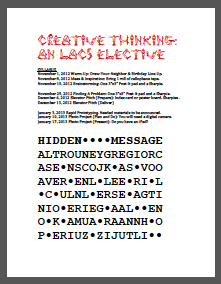 For a middle school elective course on creative thinking that I am teaching, I came up with a (hardly unique) exercise to warm-up the students to the subject.
On the syllabus sheet that was waiting for them at each seat was a “Hidden Message” puzzle. The benefit of such an approach is that a student can start on something when they enter the classroom (and when they come in at different times, it is good to have something ready for them to do – I learned this from Challenger School where students start on work that is on the board when they enter the classroom first thing in the morning – they go directly to the classroom from drop-off).
There are no specific instructions; just the title “Hidden Message.” So, as expected, students are drawn to this puzzle (rather than the syllabus) and ask about it. I say that they should try to solve it. Some will ask what they should do; in response, I ask them what they think they need to do. To keep them on task and engaged, I provide hints as needed (maybe every 30 seconds or so).
For this puzzle, I took the name roster and inserted letters that spelled “CREATIVE THINKING.” Then I added dots to make the puzzle into an even-width shape. The name roster uses the possibility that they know each others’ names already or recognize their own name first. For a mixed level class such as this, the students needed a hint that this involved their names; they asked whether they could ask each other for their names and I reminded them there were no specific instructions so were free to use whatever method they could think of. So, they started talking – but the social dynamics provided some foil where some students were not cooperative – so workarounds or negotiation became involved.
The puzzle was solved within 15 minutes which is just right for a warm-up.
Exercise Idea: Creativity Flowmeter
In Chapter 2 of Tina Seelig’s book “Ingenius,” the topic of ridiculous inventions is mentioned with particular reference to Japanese “un-useless” inventions. I picked up one such book about a year ago – “The Big Bento Box of Unuseless Japanese Inventions (101 Unuseless Japanese Inventions and 99 More Unuseless Japanese Inventions)” by Kenji Kawakami, Hugh Fearnley-Whittingstall and Dan Papia (Apr 17, 2005). When I first browsed it at a Kinokuniya in San Jose, I felt extremely “tickled” seeing the unabashed inventiveness of Japanese with high focus on their own culture.
Many of the inventions shown in this book and other similar ones could serve as prompts to measure reactions to the unusual creativity. I would compile a slide show of 20 or so of the inventions (perhaps just the image and not include the title/description) and have students fill in a “survey” of their reactions including perhaps: Useless, Ho-hum, Cool, I Could Have Thought of That! and I Wish I Had Thought of That! [<-to be refined.]
The idea is to gauge one’s creative flow as a result of viewing and judging the creativity of the un-useless inventions. This would not work so well with inventions that are familiar to our audience (eg, iPad) or are too complicated to understand the function. The lesson would also expose students to the idea that inventiveness can be derived from converging two or more apparently dissimilar objects, functions etc. This would be an exercise relevant to our discussion about divergence, convergence, crossover, spinoffs and parallelism in product design.
Thoughts: On taking a position
Today’s story on FaceBook making plans to allow younger people to sign up for accounts is full of cross-opinion.
Think of other issues that the YCISL participants may relate to differently because of their age.
Exercise: Empathy and User Experience Through the iPad
 Here are my notes for an exercise that utilizes the iPad to create a user experience-focused mini-project that combines technical (functional requirements) and emotional (user needs and preferences) design.
CSDGC
YOUTH CREATIVITY, INNOVATION & SUSTAINABLE LEADERSHIP PROGRAM
iPAD USABILITY EXERCISE
June 2, 2012
CONCEPT
Experience the interface between a developer/producer and an end-user by applying consult-design-build an iPad layout with a goal of customized usability.
FRAMEWORK
The iPad is the latest popular mobile information appliance, and is on the leading edge of human-computer interaction with largely untapped potential for usability. Students will examine various parameters of usability, develop a concept and attempt to gain user satisfaction.
THE ASSIGNMENT
Each team of students will consult with an iPad user to gather user preferences, habits and needs, then redesign the content and layout of the iPad screens – at first, on paper and getting the user buy-in; and second, implementing the design and getting customer feedback.
RULES
Each team will designate just one member to interview the client user. An interview may last up to 10 minutes.
Each team may designate up to two members to conduct an observational study. An observational study may last up to 15 minutes.
Each team must apply at least one IDEO Method Card in the data gathering part of their effort.
Up to $20 of paid apps may be purchased from the App Store. Paid apps already on the iPad do not count towards this limit. There is no limit of FREE apps from the App Store that may be installed.
Teams may provide their user with a one sheet Quick Guide to explain the new layout (this may be handy ahead of one of the challenges).
THE CHALLENGE
The team mentor will select one or more particular uses for the user to attempt using the new layout. This challenge will be scored by a combination of time in seconds to complete the task and the number of interactive motions (eg, taps, swipes, button pushes, etc). Mistaken moves will also count.
Additional notes (from my notepad):
IDEO Method Card scenarios to recommend – Flow Analysis, Personal Inventory, Cognitive Map, Narration, Fly on the Wall
The How? Understand customer habits and needs -> interview or prepare questionnaire.
Study current layout->discover likes/dislikes
Brainstorm possible improvement strategies-> Plan
Create new feature list
Uncover new uses
Increase efficiency
Address concerns
Documentation->rate satisfaction from user and developer perspectives
Implement changes->get feedback on tangibles and intangibles
Exercise: Sailcar
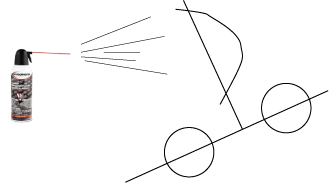
Here are my notes for a sailcar rapid prototyping exercise. It is intended to teach working on a primitive prototype of a product idea.
CSDGC
YOUTH CREATIVITY, INNOVATION & SUSTAINABLE LEADERSHIP PROGRAM
PAPER SAILCAR EXERCISE
June 4, 2012
CONCEPT
Rapid design, build and prototyping of a wheeled vehicle (out of limited materials) that is propelled by a can of compressed air.
FRAMEWORK
Working with simple materials to build a prototype is a technique employed in many product development cycles. This exercise focuses on the simple form and function of a wheeled vehicle, and provides only a can of compressed air to create movement.
THE ASSIGNMENT
Build a set of functional requirements such as number of wheels, sails, size, etc. Then render a drawn design of the proposed vehicle. Next, build the vehicle and engineer as needed within the time limit. Each team will then put their vehicle through some tests.
RULES
Materials include 3 sheets of 8.5”x11.5” cardstock, three straws, a pair of scissors and a roll of Scotch tape. Each team will also receive only one can of Duster compressed air.
Teams will have 15 minutes to work on the functional requirements and drawn design.
Teams will have 30 minutes to build and engineer their vehicle prototype.
THE CHALLENGE
Speed: To cross a finish line in the shortest time.
Distance: To cover the most longitudinal distance with x seconds of compressed air.
Maneuver: Steer the vehicle around obstacles without falling over.
VARIATIONS
Provide a balloon for propulsion (speed or distance challenge).
Design a watercraft.
Vehicle must carry golf ball.